> ## Documentation Index
> Fetch the complete documentation index at: https://atlas.rebuildingus.org/docs/llms.txt
> Use this file to discover all available pages before exploring further.
# Find housing organizers in Detroit
> A public-user walkthrough for searching Atlas, opening a profile, and inspecting source evidence.
This walkthrough shows the public Atlas experience: search a place and issue,
open a result, inspect sources, and decide what you can safely do with what you
found. You do not need an account.
 ## The question
Imagine you want to understand who is working on housing in Detroit. You are
not trying to download a dataset yet. You need a small set of credible leads
and enough source context to know whether each lead is worth opening.
## 1. Open Browse
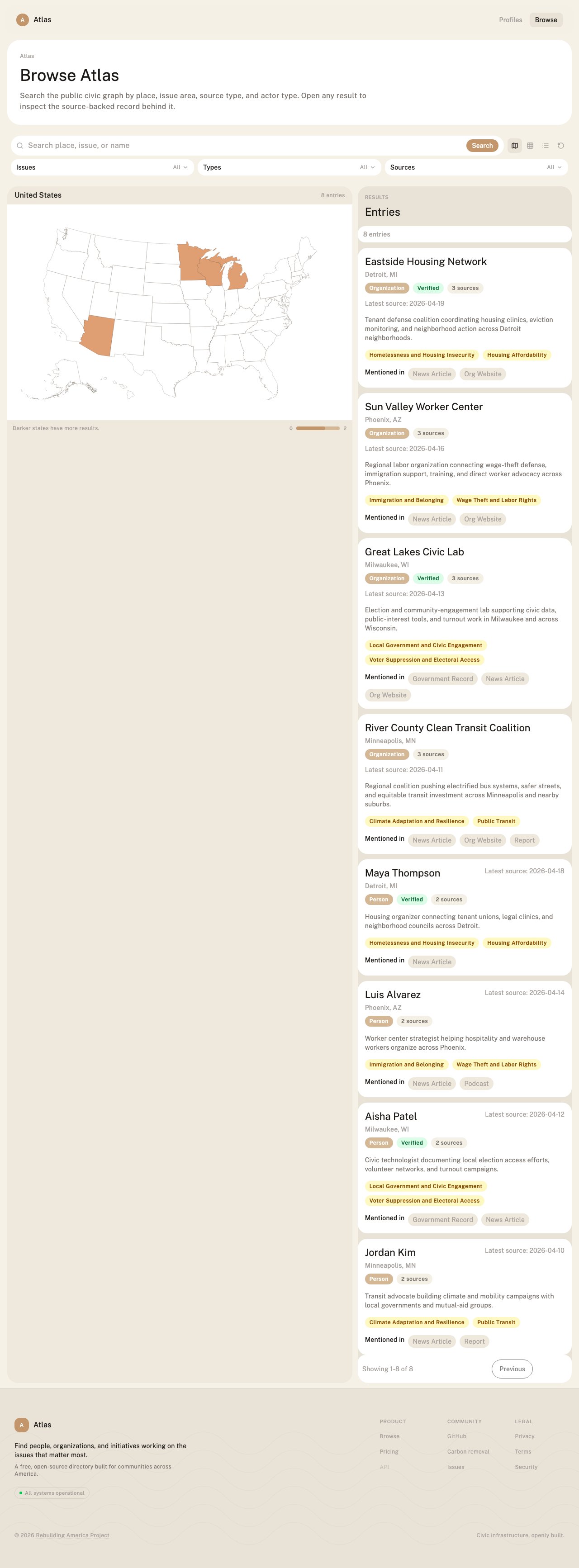
Go to [atlas.rebuildingus.org/browse](https://atlas.rebuildingus.org/browse).
Start with the search box. Try:
```text theme={null}
Detroit housing
```
If the result set is too narrow, search for:
```text theme={null}
Detroit
```
Then use issue filters to narrow the list.
## 2. Filter for the issue
Open the **Issues** filter and choose housing-related tags such as
**Housing Affordability** or **Homelessness and Housing Insecurity**.
The goal is not to make the list huge. The goal is to create a reviewable set of
profiles where the issue, place, and source evidence all line up.
## 3. Scan the result cards
Each result card should help you decide whether to open the profile:
| Card signal | What to look for |
| ------------- | ------------------------------------------------------------------------------------------------------------ |
| Name and type | Is this a person, organization, initiative, campaign, or event? |
| Place | Is the actor actually tied to Detroit or the surrounding region? |
| Issue tags | Do the tags match housing, tenant organizing, homelessness, or the related issue you care about? |
| Source count | Is this a single-source lead or a better-corroborated record? |
| Latest source | Is the evidence recent enough for your use? |
| Mentioned in | What source types support the profile: news, organization website, public record, report, or another source? |
## 4. Open a profile
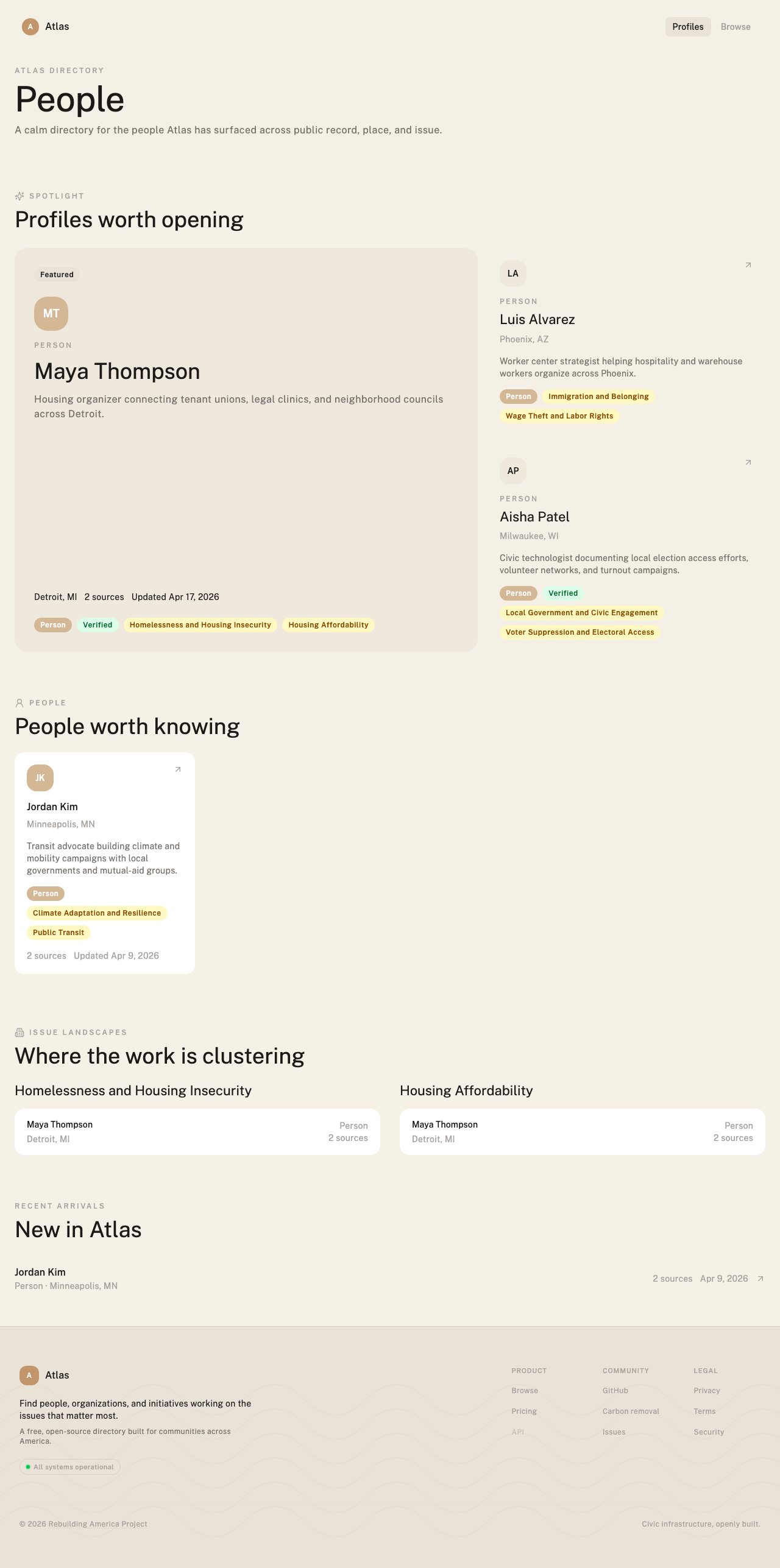
Open a promising result, such as a housing organizer or tenant group. On the
profile, look for:
* A short description of the work.
* Place and issue tags.
* Source count and freshness.
* Source titles, publishers, dates, URLs, and excerpts.
* Related actors or issue areas.
## The question
Imagine you want to understand who is working on housing in Detroit. You are
not trying to download a dataset yet. You need a small set of credible leads
and enough source context to know whether each lead is worth opening.
## 1. Open Browse
Go to [atlas.rebuildingus.org/browse](https://atlas.rebuildingus.org/browse).
Start with the search box. Try:
```text theme={null}
Detroit housing
```
If the result set is too narrow, search for:
```text theme={null}
Detroit
```
Then use issue filters to narrow the list.
## 2. Filter for the issue
Open the **Issues** filter and choose housing-related tags such as
**Housing Affordability** or **Homelessness and Housing Insecurity**.
The goal is not to make the list huge. The goal is to create a reviewable set of
profiles where the issue, place, and source evidence all line up.
## 3. Scan the result cards
Each result card should help you decide whether to open the profile:
| Card signal | What to look for |
| ------------- | ------------------------------------------------------------------------------------------------------------ |
| Name and type | Is this a person, organization, initiative, campaign, or event? |
| Place | Is the actor actually tied to Detroit or the surrounding region? |
| Issue tags | Do the tags match housing, tenant organizing, homelessness, or the related issue you care about? |
| Source count | Is this a single-source lead or a better-corroborated record? |
| Latest source | Is the evidence recent enough for your use? |
| Mentioned in | What source types support the profile: news, organization website, public record, report, or another source? |
## 4. Open a profile
Open a promising result, such as a housing organizer or tenant group. On the
profile, look for:
* A short description of the work.
* Place and issue tags.
* Source count and freshness.
* Source titles, publishers, dates, URLs, and excerpts.
* Related actors or issue areas.
 ## 5. Read the sources before acting
This is the most important step. A profile is useful because you can inspect the
public evidence behind it.
Ask:
* Does the source actually mention the person or organization?
* Does the source connect them to Detroit, housing, or the issue I searched?
* Is the source recent?
* Is the record supported by more than one independent source?
* Is the source strong enough for the action I am about to take?
If you are only making a research list, one source may be enough. If you plan to
publish, fund, contact, or brief a team, open the sources and verify the
specific claim you plan to rely on.
## 6. Decide what comes next
Public users can:
* Search and browse profiles.
* Open source-linked records.
* Filter by place, issue, actor type, and source type.
* Flag records that appear incorrect or stale.
* Use the public API within the free request limit.
Signed-in workspace users can also save actors to lists, build briefs, track
coverage, watch for changes, run discovery, and export proof.
## If the result is thin
Thin results are still information. They may mean:
* The issue is under-covered in public sources.
* Atlas has not seen enough sources for that place and issue.
* The relevant actors use different language than your search terms.
* You need a broader place filter, a different issue tag, or a manual Scout run.
Try broadening to Michigan, searching for "tenant union", or checking related
issue areas. If you are working as a team, turn the missing evidence into a
coverage gap.
## Next steps
Learn how to interpret source evidence, stale data, and partial records.
Turn a public search into a source-linked workspace briefing.
Find organizations working on transit in Nevada with the API.
Run local discovery and sync selected results to Atlas.
## 5. Read the sources before acting
This is the most important step. A profile is useful because you can inspect the
public evidence behind it.
Ask:
* Does the source actually mention the person or organization?
* Does the source connect them to Detroit, housing, or the issue I searched?
* Is the source recent?
* Is the record supported by more than one independent source?
* Is the source strong enough for the action I am about to take?
If you are only making a research list, one source may be enough. If you plan to
publish, fund, contact, or brief a team, open the sources and verify the
specific claim you plan to rely on.
## 6. Decide what comes next
Public users can:
* Search and browse profiles.
* Open source-linked records.
* Filter by place, issue, actor type, and source type.
* Flag records that appear incorrect or stale.
* Use the public API within the free request limit.
Signed-in workspace users can also save actors to lists, build briefs, track
coverage, watch for changes, run discovery, and export proof.
## If the result is thin
Thin results are still information. They may mean:
* The issue is under-covered in public sources.
* Atlas has not seen enough sources for that place and issue.
* The relevant actors use different language than your search terms.
* You need a broader place filter, a different issue tag, or a manual Scout run.
Try broadening to Michigan, searching for "tenant union", or checking related
issue areas. If you are working as a team, turn the missing evidence into a
coverage gap.
## Next steps
Learn how to interpret source evidence, stale data, and partial records.
Turn a public search into a source-linked workspace briefing.
Find organizations working on transit in Nevada with the API.
Run local discovery and sync selected results to Atlas.